Stonehenge, Skies and Photoshop: Where Should UK Photographers Draw the Line?
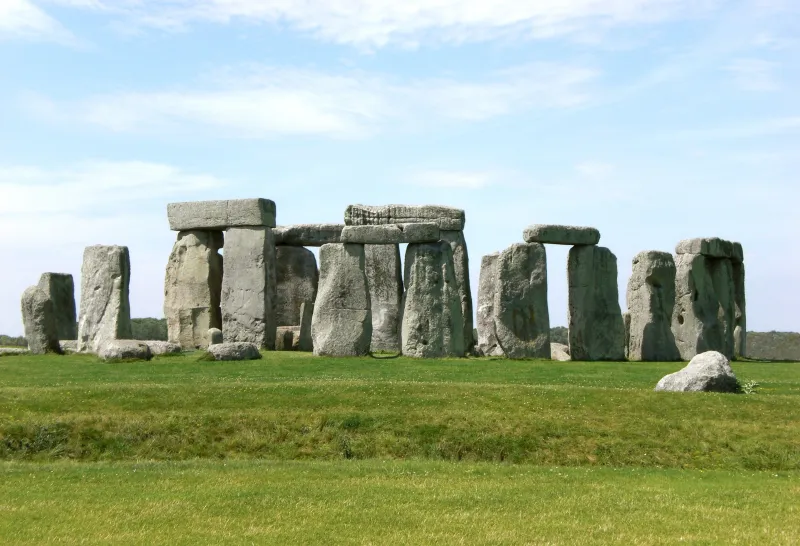
Photo: Stonehenge dramatic cloudy sky England heritage landmark, via upload.wikimedia.org
Picture the scene. You have spent a cold morning at Stonehenge waiting for a break in the cloud. The stones are doing their thing, the visitors are drifting about, and the light is doing absolutely nothing. You get home, the stones are fine, the sky is a flat white nothing. Photoshop's sky replacement tools are one click away. Should you use them?
This is one of the more interesting arguments in UK photography right now. The tools are better than ever, and the results can be genuinely convincing. But heritage landmarks carry a different weight from a random field. They are places people travel to see, study and photograph precisely because they are real. Once we start changing the sky above them, we need to be clear about what we are making: a photograph, an illustration, or something in between.
Why sky replacement is so tempting
The UK is not short of dramatic skies, but it is also not short of flat ones. A grey day at Whitby Abbey or a drizzly afternoon in the Lake District can produce beautiful soft light, but it rarely gives you the wow factor that social media rewards. Sky replacement offers a shortcut: a dramatic sunset behind Edinburgh Castle, a moody storm over Kinder Scout, a clean blue sky above Stonehenge.
Photoshop's AI tools make the selection part easy. They can recognise the sky, mask around trees and buildings, and blend a new sky with surprising speed. For creative work, that is brilliant. For documentary work, it is a warning sign.
Where documentation ends and illustration begins
My view is fairly simple. If the image is being presented as a record of what was there, do not replace the sky. If it is being presented as a creative illustration, go ahead, but be honest about it.
The line is not about whether you used Photoshop. Almost every photograph is processed. The line is about the claim the image makes. A landscape print for your living room can have a sky from another day, another county or another country. A news photograph, a council tourism brochure or a heritage site's official social media post is making a different promise. It is saying: this is the place, on a day you could have visited.
At Stonehenge, the sky is part of the experience. The stones are the subject, but the weather shapes the mood. Swap in a fiery sunset from the Cotswolds and you have not captured Stonehenge; you have used Stonehenge as a backdrop. That can be fine as art. It is less fine as documentation.
The heritage landmark problem
Heritage sites are especially sensitive because they are already carefully managed. Stonehenge has a visitor centre, timed entry and a landscape that is protected for good reason. Edinburgh Castle sits in a cityscape where the skyline matters. The Lake District is a national park whose whole identity is tied to its weather, its light and its hills.
If a photographer adds a dramatic sky to a Lake District fell, the image may still look plausible. That is the problem. A sky from the Alps or the Highlands can look convincing in isolation, but it can misrepresent the place. The Lake District is not just a collection of hills; it is a specific landscape with specific weather. A sky replacement can quietly turn a real place into a generic backdrop.
There is also the commercial angle. If you are shooting for a client who expects accurate representation, ask before you swap. If you are shooting for a portfolio or a creative print, label it if the sky is not real. Disclosure does not ruin the image. It just keeps the conversation honest.
A practical test before you swap
Before you drag a new sky into a heritage image, run through a few questions.
Is the image being sold as truthful? If yes, stop. Does the new sky match the light direction, colour temperature and shadows in the original? If not, fix it or leave it. Is the sky from a similar region and season? A tropical cumulus sky over the Yorkshire Dales will look wrong to anyone who knows the area. Would a caption need a note? If so, add one. Are you changing more than the sky? If you are also removing people, adding birds or altering the stones, you are no longer doing sky replacement. You are building a scene.
These questions are not meant to kill creativity. They are meant to keep it honest.
How to use Photoshop's sky tools responsibly
If you decide to swap, do it well. Start with your own sky plates where possible. A sky you photographed yourself will usually match the light and colour of the scene better than a stock sky from a different climate. Use Photoshop's Sky Replacement as a starting point, then refine the mask by hand. AI selections can miss fine branches, castle battlements and the gaps between stones.
Match the horizon and the light. A replacement sky with a sun in the wrong place will create shadows that do not make sense. Reduce the opacity of the sky layer and blend it with Curves or Color Balance so it sits in the scene. Avoid over-sharpened, over-saturated skies; they are the quickest way to make a composite look fake. Keep your original RAW file, and if the image is for editorial or client work, be transparent about what you changed.
My take
I am not against sky replacement. I am against pretending. Creative photography has always involved construction, from darkroom dodging and burning to digital compositing. But heritage landmarks come with a bit of responsibility. They are not just pretty shapes; they are places with histories, communities and visitors.
Use AI skies to make art, to learn compositing, or to build a fantasy version of a place. Use them carefully and sparingly for client work. But if the picture is meant to show Stonehenge, Edinburgh Castle or a Lake District fell as it actually was, leave the sky alone. Some grey days deserve to stay grey.